TABLE OF CONTENTS
- Implementing Webhooks in Your Pinpointe Account
- "Opens" Webhook Payload
- "Clicks" Webhook Payload
- "Bounce" Webhook Payload
- "Unsubscribe" Webhook Payload
Overview
Using webhooks, Pinpointe makes it possible to integrate your own application with your Pinpointe email service account when tracking your subscribers' campaign opens, links clicks, bounces, unsubscribe events. and spam complaints.
A webhook is an API method that allows a service (Pinpointe) to provide another application (using as a URL you specify) near-real time information as it is created. For example, if one of your subscribers opens an email, this information is processed at Pinpointe and the webhook then makes a POST request to your specified URL with the "Open" event's details.
Unlike a "traditional" API call that must be initiated by the requester (you), a webhook is essentially always on and will send data whenever the triggering event occurs. Pinpointe currently offers webhooks for five events using our updated Webhook 2.0 feature: campaign opens, link clicks (within a campaign), a bounce event, an unsubscribe event, and the initiation of a spam complaint. Each webhook delivers a JSON-formatted payload to the URL destination you provide.
Implementing Webhooks in Your Pinpointe Account
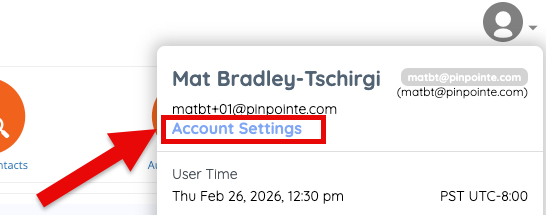
To use the webhooks, you need to go into Account Settings in your account. To do so, roll your cursor over the small avatar icon at the top right of your account pages and click "Account Settings" (Fig 1):
Fig 1
You will now be on this page (Fig 2):
Fig 2
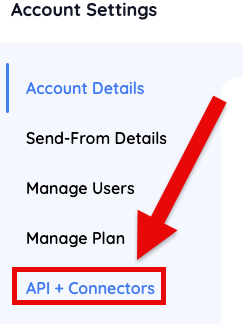
Click on the menu option - "API + Connectors" then click Webhooks (Fig 3).
Fig 3
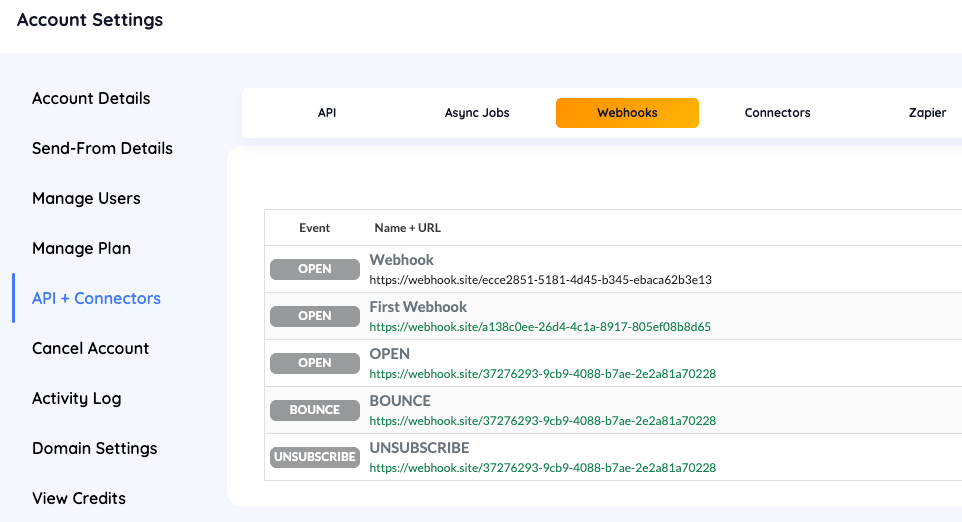
To create a webhook connection, click the orange "Add Webhook" button. You will be presented with this popup (Fig 4):
Fig 4
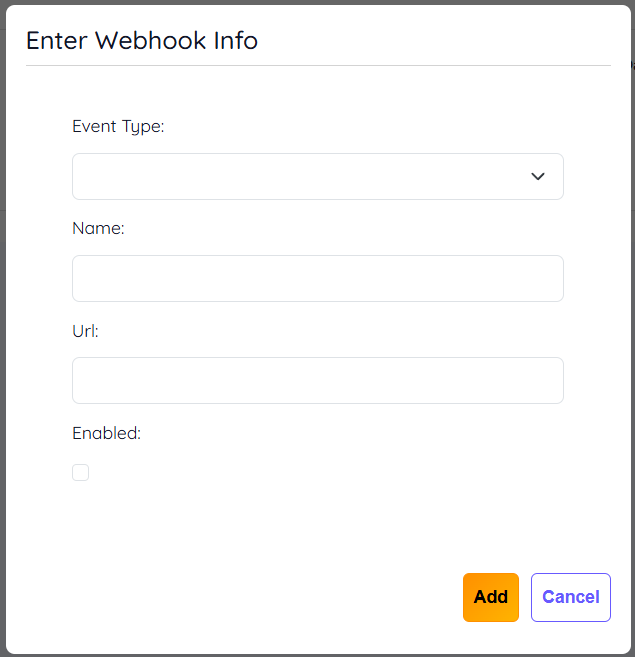
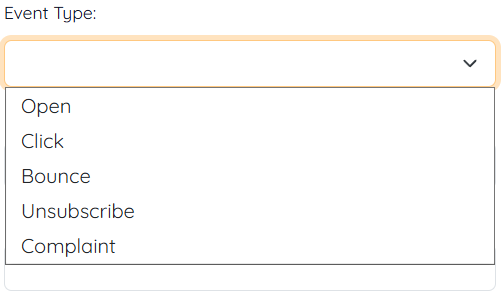
By clicking into the input field under "Event Type", you can select from one of the five webhook types (Fig 5):
Fig 5
 You will now need to provide two pieces of information: some name of your choosing for the webhook you are creating, and the destination URL where you want the webhook payload to be delivered.
NOTE: Pinpointe provides for the use of three additional parameters which uses a variable value that may be appended to the URL for tracking purposes. A user may elect to use one, two or all three parameters in their URL.
The available variables are:
- %%event%%
- %%newsletterid%%
- %%userid%%
The raw URL that would be configured in the webhook setup section in Account Settings would be something like this:
https://<some-user-specified-URL>?event_type=%%event%%&campaign_id=%%newsletterid%%&user_id=%%userid%%
Please note that the parameter names themselves are user-defined. "event type" could have been "event", "event-name", or any valid string the user selects.
An example URL returned based on an open event with the user-specified parameter names is show in Fig 5-b below.
Fig 5-b

For high-volume senders with perhaps multiple user accounts, this allows the customer to create differentiated webhook receiving URLs rather than having all JSON payloads returned to a single URL.
Now click the check box labeled "Enabled" when you are finished (this will send a test JSON payload packet to you specified URL), and then make sure to click the small "Add" button to save your configuration. You will now be back on the main API + Connectors page (Fig 6).
Fig 6
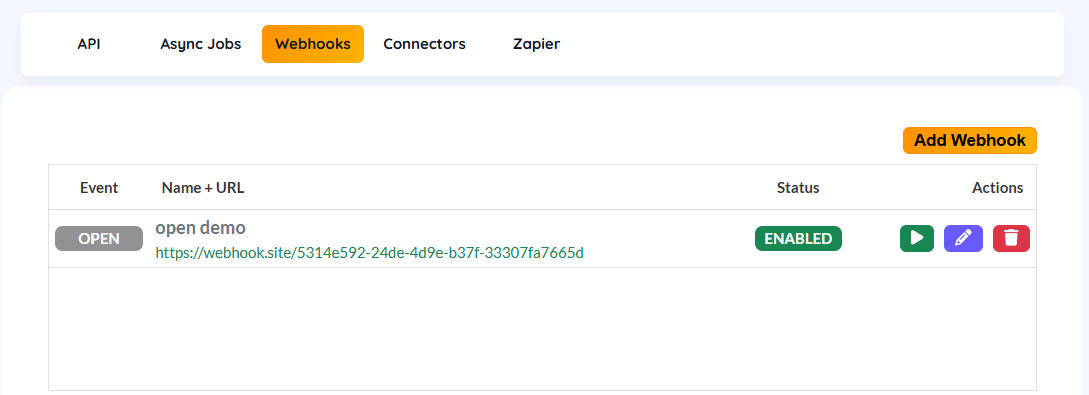
Additional actions you can take on this page are:
- Clicking the green arrow button to send another test JSON payload
- Clicking the blue pen button to edit the webhook
- Clicking the red trashcan button to permanently delete the webhook
EVENT PAYLOAD EXAMPLES
"Opens" Webhook Payload
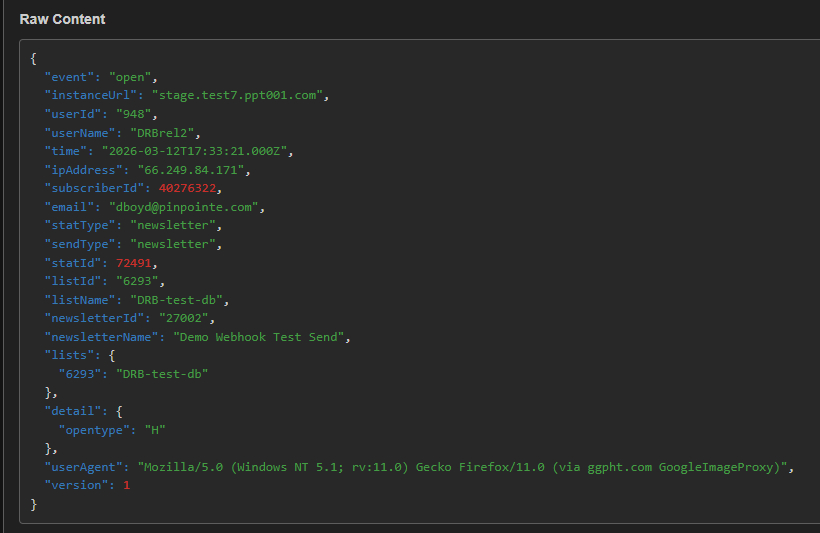
Fig 7 shows an example of the webhook payload delivered when using the "Opens" webhook:
Parameter Returned Value
| event | open |
| instanceUrl | The Pinpointe instance from which the event's JSON payload originated |
| userId | Pinpointe User ID of the account owner who created the webhook |
| userName | Pinpointe User Name of the account owner who created the webhook |
| time | Timestamp of recorded event in Zulu timestamp format |
| ipAddress | IP address of the server reporting the event, such as a bounce server, etc. |
| subscriberId | The contact's Pinpointe subscriber ID |
| Contact's email address | |
| statType | Pinpointe designation for the type of stat - will default to "newsletter" for either a normal "newsletter" send, a "journey" send or a "splittest" send. |
| sendType | Pinpointe designation for the type of send: "newsletter", "journey" or "splittest" |
| statId | Pinpointe stat ID for that specific campaign send |
| listId | Pinpointe's database numerical identifier for the database the recipient contact is in |
| listName | The name you have given your Pinpointe database |
| newsletterId | Pinpointe numerical identifier for that specific newsletter |
| newsletterName | The name you have given the newsletter (campaign) |
| lists | The array of database(s) the campaign was sent to for this send event |
| detail | The value for the "opentype" of the send, such as "H" for html or "T" for text-based campaign |
| userAgent | The software application information the contact used to open the email, including device, OS and email client |
Fig 7
"Clicks" Webhook Payload
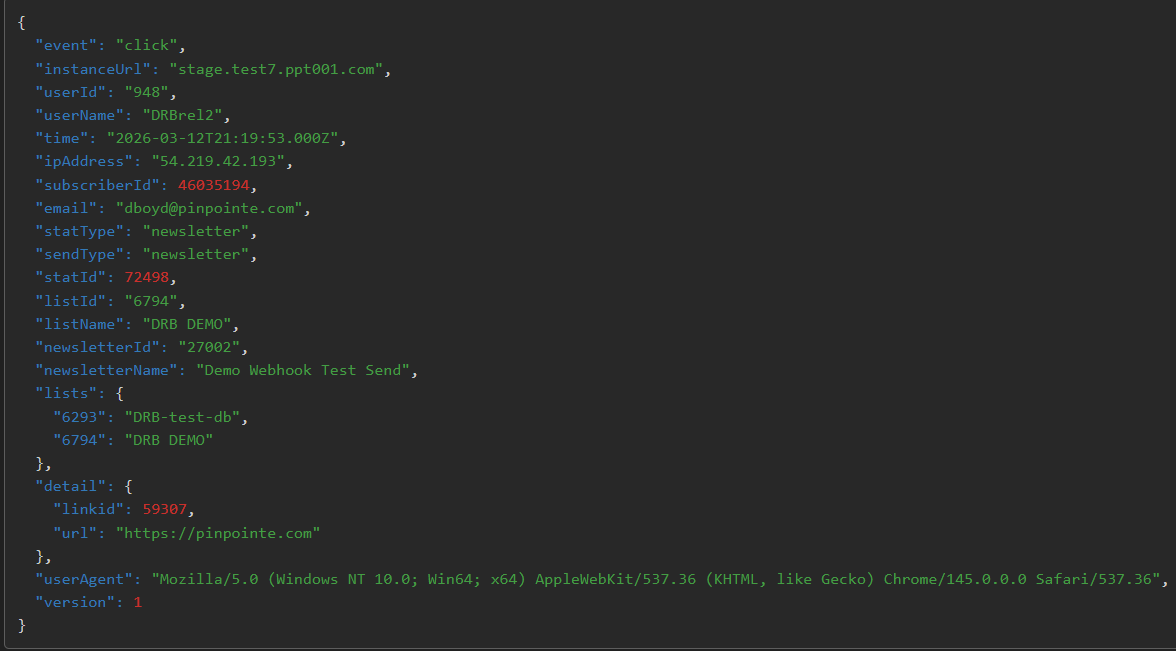
Fig 8 shows an example of the webhook payload delivered when using the "Clicks" webhook:
| event | click |
| instanceUrl | The Pinpointe instance from which the event's JSON payload originated |
| userId | Pinpointe User ID of the account owner who created the webhook |
| userName | Pinpointe User Name of the account owner who created the webhook |
| time | Timestamp of recorded event in Zulu timestamp format |
| ipAddress | IP address of the server reporting the event, such as a bounce server, etc. |
| subscriberId | The contact's Pinpointe subscriber ID |
| Contact's email address | |
| statType | Pinpointe designation for the type of stat - will default to "newsletter" for either a normal "newsletter" send, a "journey" send or a "splittest" send. |
| sendType | Pinpointe designation for the type of send: "newsletter", "journey" or "splittest" |
| statId | Pinpointe stat ID for that specific campaign send |
| listId | Pinpointe's database numerical identifier for the database the recipient contact is in |
| listName | The name you have given your Pinpointe database |
| newsletterId | Pinpointe numerical identifier for that specific newsletter |
| newsletterName | The name you have given the newsletter (campaign) |
| lists | The array of database(s) the campaign was sent to for this send event |
| detail - linkid | The link ID in the Pinpointe app |
| detail - url | The URL the link redirects to |
| userAgent | The software application information the contact used to open the email, including device, OS and email client app |
Fig 8
"Bounce" Webhook Payload
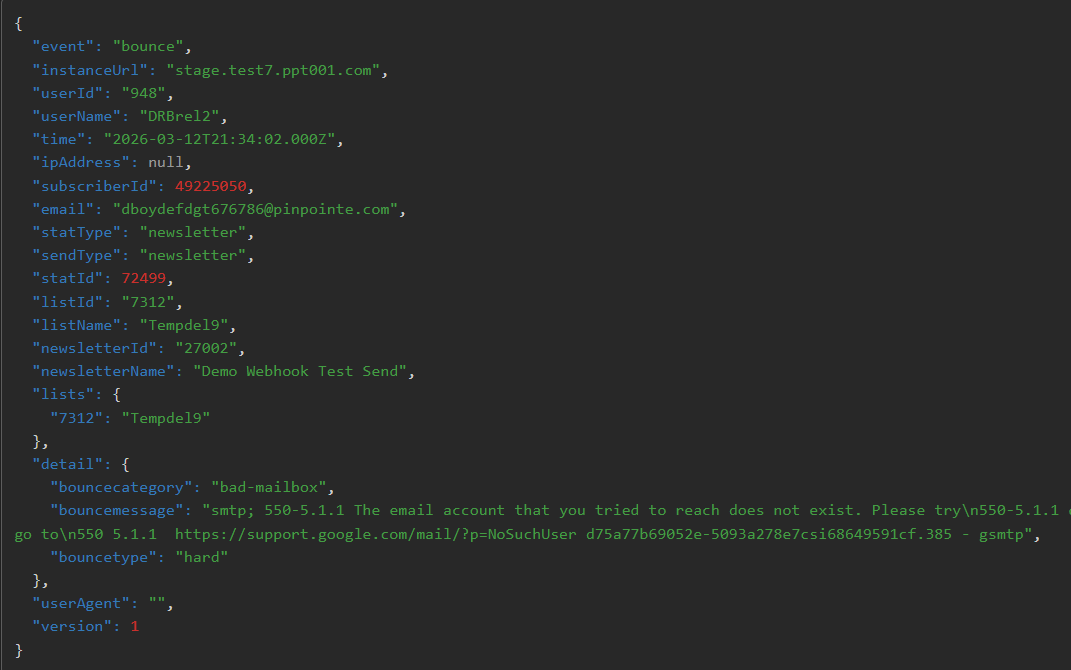
Fig 9 shows an example of the payload delivered when using the "Bounce" webhook:
| event | bounce |
| instanceUrl | The Pinpointe instance from which the event's JSON payload originated |
| userId | Pinpointe User ID of the account owner who created the webhook |
| userName | Pinpointe User Name of the account owner who created the webhook |
| time | Timestamp of recorded event in Zulu timestamp format |
| ipAddress | IP address of the server reporting the event, such as a bounce server, etc. |
| subscriberId | The contact's Pinpointe subscriber ID |
| Contact's email address | |
| statType | Pinpointe designation for the type of stat - will default to "newsletter" for either a normal "newsletter" send, a "journey" send or a "splittest" send. |
| sendType | Pinpointe designation for the type of send: "newsletter", "journey" or "splittest" |
| statId | Pinpointe stat ID for that specific campaign send |
| listId | Pinpointe's database numerical identifier for the database the recipient contact is in |
| listName | The name you have given your Pinpointe database |
| newsletterId | Pinpointe numerical identifier for that specific newsletter |
| newsletterName | The name you have given the newsletter (campaign) |
| lists | The array of database(s) the campaign was sent to for this send event |
| detail - bouncecategory | The bounce category as reported back by the recipient's mail server |
| detail - bouncemessage | The notification sent by the recipient's mail server indicating the email could not be delivered and a generalized reason as to why |
| detail - bouncetype | Indicates whether the bounce was "hard" or "soft" |
| userAgent | The software application information the contact used to open the email, including device, OS and email client |
Fig 9
"Unsubscribe" Webhook Payload
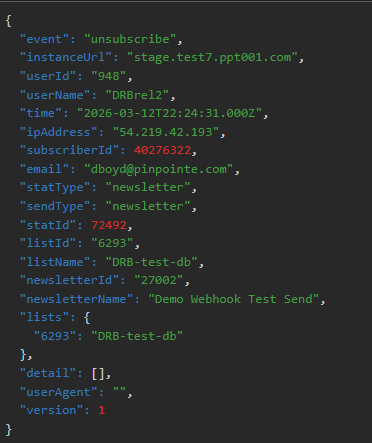
Fig 10 shows an example of the payload delivered when using the "Unsubscribe" webhook:
| event | unsubscribe |
| instanceUrl | The Pinpointe instance from which the event's JSON payload originated |
| userId | Pinpointe User ID of the account owner who created the webhook |
| userName | Pinpointe User Name of the account owner who created the webhook |
| time | Timestamp of recorded event in Zulu timestamp format |
| ipAddress | IP address of the server reporting the event, such as a bounce server, etc. |
| subscriberId | The contact's Pinpointe subscriber ID |
| Contact's email address | |
| statType | Pinpointe designation for the type of stat - will default to "newsletter" for either a normal "newsletter" send, a "journey" send or a "splittest" send. |
| sendType | Pinpointe designation for the type of send: "newsletter", "journey" or "splittest" |
| statId | Pinpointe stat ID for that specific campaign send |
| listId | Pinpointe's database numerical identifier for the database the recipient contact is in |
| listName | The name you have given your Pinpointe database |
| newsletterId | Pinpointe numerical identifier for that specific newsletter |
| newsletterName | The name you have given the newsletter (campaign) |
| lists | The array of database(s) the campaign was sent to for this send event |
| userAgent | No userAgent information is provided for unsubscribe events |
Fig 10
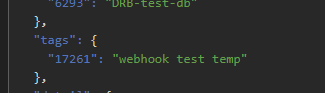
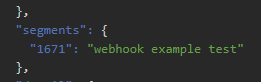
NOTE: If a campaign send is to a tagged list or a segment, this information will also be included in the returned JSON payload. See Fig 11.
Fig 11
NOTE: There is no example for the "Complaints" webhook JSON.
For assistance with using Pinpointe's webhook feature, please contact Pinpointe Support.